
Introduction
For several years, businesses have been experimenting with AI chatbots.
A customer asks a question.
The chatbot generates an answer.
An employee asks for information.
The AI provides a response.
This has already changed customer support, internal knowledge management, marketing, and many other business functions.
But the next evolution of enterprise AI goes beyond simply answering questions.
Businesses are beginning to explore systems that can understand a goal, gather information, use business applications, perform multiple steps, and take actions.
These systems are commonly referred to as AI agents.
The difference is important.
A chatbot primarily helps you communicate with AI.
An AI agent is designed to help you accomplish a task with AI.
That shift—from conversation to execution—is one of the most important developments in modern business automation.
What Is an AI Agent?
An AI agent is a software system that combines an AI model with instructions, context, tools, business data, and the ability to perform actions.
Instead of only generating a response, an agent can potentially determine what needs to happen next and use authorized tools to accomplish a goal.
A simplified agent workflow looks like this:
Business Goal
      ↓
Understand Request
      ↓
Gather Context
      ↓
Plan Steps
      ↓
Select Tools
      ↓
Execute Actions
      ↓
Check Result
      ↓
Continue / Escalate
For example, imagine a sales manager says:
"Find high-value leads that have not been followed up this week and prepare the next action for each one."
A traditional chatbot may explain how to find those leads.
An AI agent connected to the CRM could potentially:
Access authorized CRM data
Identify high-value opportunities
Check recent activities
Determine which leads require attention
Analyze the available context
Prepare recommended actions
Draft follow-up communication
Update relevant records
Ask for human approval where required
The difference is that the AI is participating in the workflow, not just the conversation.
AI Agent vs Chatbot
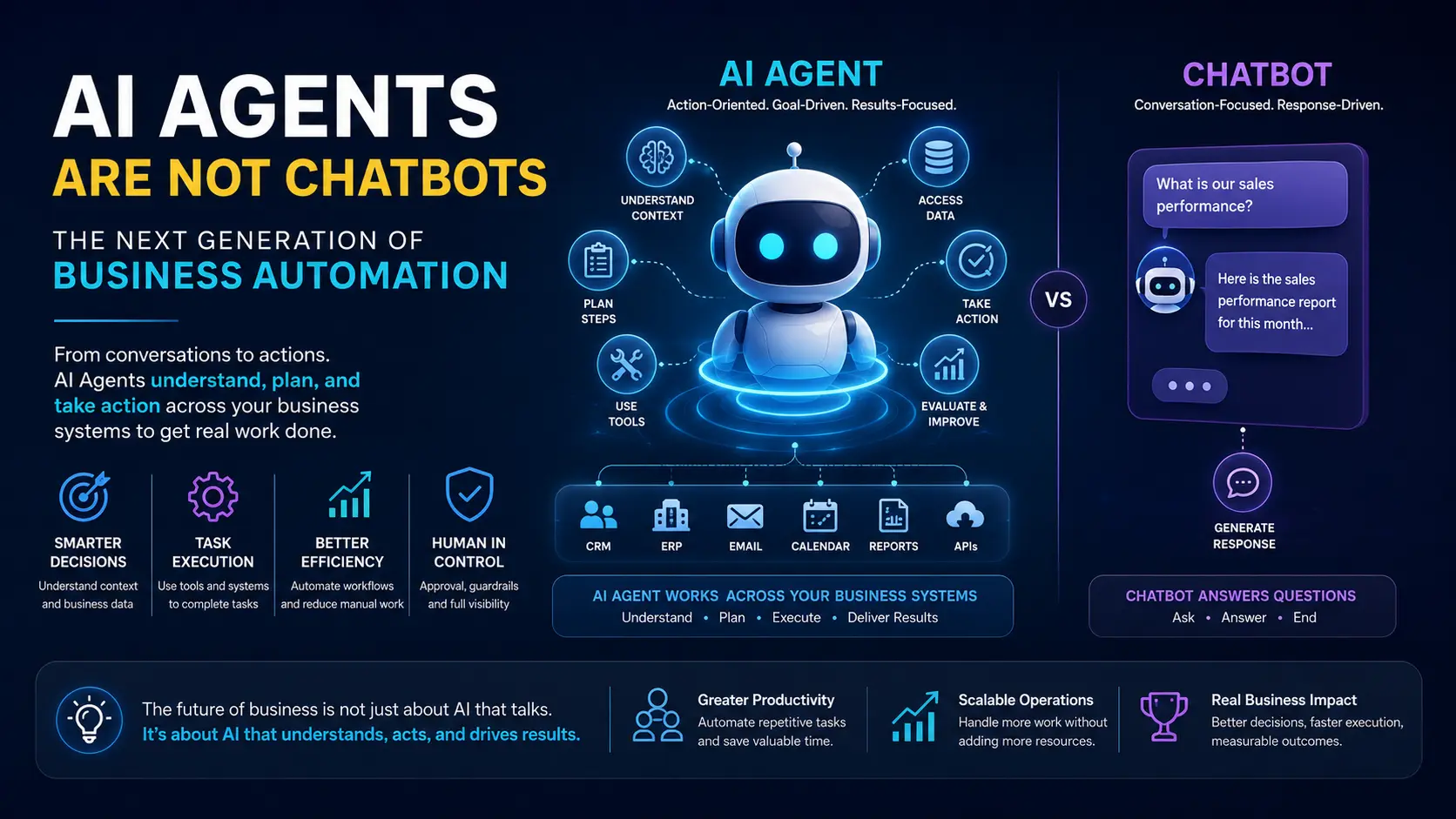
The terms are often used interchangeably, but they describe different capabilities.
Traditional Chatbot
A chatbot generally follows this pattern:
User
 ↓
Question
 ↓
AI Model
 ↓
Answer
Its primary responsibility is communication.
AI Agent
An agent can follow a much larger loop:
User / Event
      ↓
AI Agent
      ↓
Understand Goal
      ↓
Gather Information
      ↓
Plan
      ↓
Use Tools
      ↓
Take Action
      ↓
Evaluate Result
      ↓
Next Action / Human Approval
The chatbot responds.
The agent can reason about a task and operate within a defined environment.
This does not mean every AI agent is fully autonomous. In enterprise environments, agents often operate with strict permissions, predefined tools, business rules, and human approval.
The Fundamental Difference: Answer vs Action
The easiest way to understand the difference is to look at what happens after the AI generates an answer.
Chatbot
"Here is the information you requested."
The interaction generally ends there.
AI Agent
"I found the information, identified the required action, completed the permitted steps, and reported the result."
The AI becomes part of the operational process.
This creates a fundamental shift:
Chatbots are primarily interaction systems.
AI agents are action-oriented systems.
Why AI Agents Matter for Business Automation
Traditional automation has been extremely effective for predictable processes.
For example:
IF invoice is overdue
THEN send reminder
This works because the rule is clear.
But businesses contain many processes that cannot be described through simple rules.
Consider an incoming customer email.
It could be:
A sales inquiry
A complaint
A support request
A pricing request
A refund request
A partnership inquiry
A document submission
An urgent escalation
Traditional automation may need dozens of rules to classify these situations.
An AI agent can potentially understand the meaning and context of the request before deciding which workflow should be triggered.
This creates a new model:
Unstructured Information
          ↓
       AI Agent
          ↓
   Understand Context
          ↓
   Determine Intent
          ↓
    Select Workflow
          ↓
      Take Action
AI therefore becomes an intelligence layer on top of traditional automation.
How an AI Agent Works
A production AI agent is much more than an LLM.
A practical architecture can contain several components.
1. AI Model
The language model provides capabilities such as:
Understanding natural language
Reasoning
Classification
Summarization
Planning
Information extraction
Decision support
The model itself does not necessarily have access to your business systems.
That capability comes from the surrounding architecture.
2. Instructions and Goals
The agent needs to understand:
What is its role?
What is it allowed to do?
What objective is it trying to achieve?
What rules must it follow?
When should it ask for human approval?
For example:
Agent Role:
Sales Operations Agent

Goal:
Identify inactive high-value opportunities.

Allowed Actions:
- Read CRM opportunities
- Read activity history
- Create follow-up tasks
- Generate email drafts

Restricted Actions:
- Delete opportunities
- Change pricing
- Send external communication without approval
This makes the agent more controllable.
3. Business Context
An AI agent becomes useful when it has access to the right context.
For a sales agent, that might include:
Customer profile
Lead history
Previous communication
Deal value
Sales stage
Follow-up history
Product information
Sales policies
For an HR agent:
Employee information
Company policies
Leave records
Attendance
Organizational structure
HR documents
For an operations agent:
Tasks
Projects
Orders
Inventory
Operational events
Performance data
The AI model provides intelligence.
Business context makes that intelligence relevant.
4. Tools
This is one of the most important differences between a basic chatbot and an AI agent.
Tools allow an agent to interact with external systems.
A tool could be:
Search CRM
Create CRM lead
Send email
Create calendar event
Query database
Generate report
Search documents
Create support ticket
Update ERP record
Trigger workflow
Call an external API
For example:
AI Agent
   │
   ├── Search CRM
   ├── Create Task
   ├── Send Email
   ├── Generate Report
   └── Update Customer
The agent decides which authorized tool is appropriate for a particular task.
5. APIs and Integration Layer
Business applications normally expose functionality through APIs.
An AI agent can use an integration layer to communicate with those systems.
For example:
AI Agent
    ↓
Tool / Integration Layer
    ↓
API
    ↓
CRM
    ↓
Database
This is why APIs become particularly important in an agentic architecture.
The AI does not need to directly access the database or internal infrastructure.
Instead, the organization can expose controlled business capabilities through APIs and tools.
6. Memory and State
Some business processes require information from previous interactions.
For example, a customer service agent may need to understand:
What the customer asked previously
Which solution was provided
What remains unresolved
Which actions have already been taken
The system can maintain appropriate state or retrieve relevant historical information when needed.
However, "AI memory" should not mean giving an agent unlimited access to everything.
Enterprise memory should be designed around:
Relevance
Permissions
Data retention
Privacy
Security
Auditability
7. Workflow and Orchestration
Not every decision should be delegated entirely to the AI model.
A strong enterprise architecture often combines AI reasoning with deterministic workflows.
For example:
Customer Request
      ↓
AI understands request
      ↓
Determine request type
      ↓
Traditional workflow
      ↓
Check business rules
      ↓
AI generates response
      ↓
Human approval
      ↓
Send response
This hybrid approach is often more reliable than asking an AI model to control an entire business process without constraints.
AI Agents and Traditional Automation
AI agents do not replace traditional automation.
They complement it.
Traditional Automation
Best suited for:
Fixed rules
Predictable processes
Calculations
Scheduled jobs
Data synchronization
Notifications
Deterministic approvals
Example:
Order Paid
   ↓
Update Order Status
   ↓
Generate Invoice
   ↓
Send Confirmation
AI Automation
More useful for:
Understanding language
Classifying information
Extracting information from documents
Interpreting context
Generating content
Handling ambiguous requests
Making recommendations
Coordinating multiple steps
Example:
Customer Email
      ↓
AI Understands Request
      ↓
Identify Customer
      ↓
Review History
      ↓
Determine Intent
      ↓
Select Workflow
      ↓
Generate Response
The most capable enterprise systems will often use both.
From Rule-Based Automation to Agentic Automation
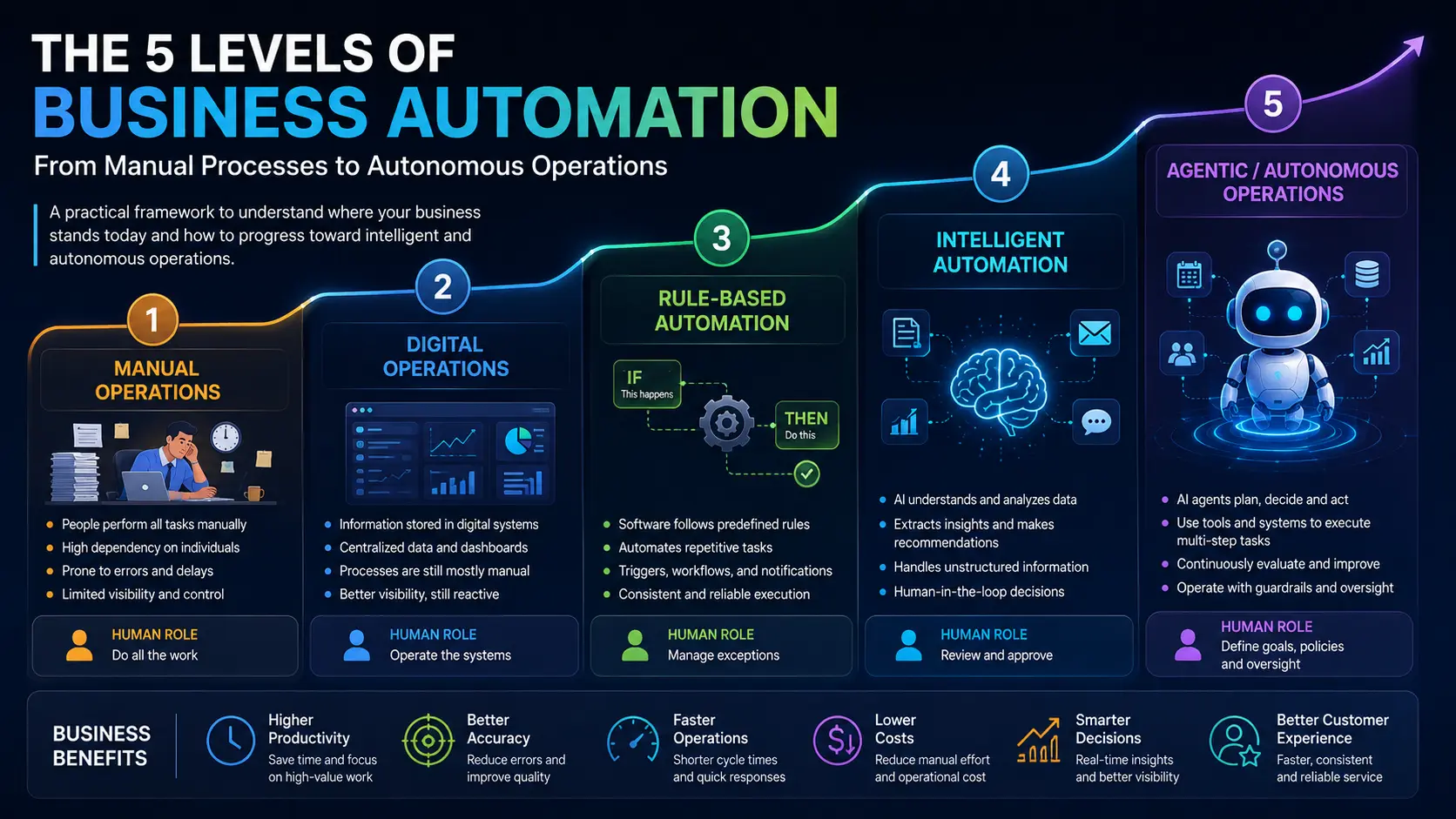
Business automation is evolving through several stages.
Stage 1 — Manual
Human → Human → HumanPeople perform most tasks manually.
Stage 2 — Digital
Human → Software → DatabaseInformation becomes digital.
Stage 3 — Rule-Based Automation
Event → Rule → Workflow → ActionSoftware performs predefined tasks.
Stage 4 — AI-Assisted Automation
Data → AI → Recommendation → HumanAI helps employees make decisions.
Stage 5 — Agentic Automation
Goal
 ↓
AI Agent
 ↓
Plan
 ↓
Tools
 ↓
Actions
 ↓
Result
AI can participate directly in multi-step workflows within defined boundaries.
This progression does not mean companies should immediately jump to autonomous agents.
The appropriate level depends on the complexity, risk, and predictability of each process.
Real-World Example: AI Sales Agent
Consider a real estate company receiving hundreds of property inquiries.
A traditional workflow might look like:
Inquiry
 ↓
Sales Executive
 ↓
Check Customer
 ↓
Check Property
 ↓
Call Customer
 ↓
Update CRM
 ↓
Schedule Follow-up
An AI-powered sales operation could introduce an agent:
New Inquiry
     ↓
AI Sales Agent
     ↓
Understand Requirement
     ↓
Match Available Properties
     ↓
Check Customer History
     ↓
Prioritize Lead
     ↓
Prepare Response
     ↓
Create CRM Task
     ↓
Notify Sales Executive
With appropriate permissions and controls, some additional steps could also be automated.
The human sales executive can then focus on the higher-value part of the process: building the relationship and closing the opportunity.
Real-World Example: AI Operations Agent
Imagine an organization where management needs a daily operational report.
Traditionally:
HR Team
   ↓
Sales Team
   ↓
Operations Team
   ↓
Collect Data
   ↓
Prepare Excel
   ↓
Verify Data
   ↓
Create Report
   ↓
Management
An operations agent could potentially coordinate the process:
Scheduled Event
      ↓
AI Operations Agent
      ↓
Retrieve Authorized Data
      ↓
Analyze Changes
      ↓
Identify Exceptions
      ↓
Generate Report
      ↓
Notify Management
Instead of simply showing dashboards, the system can potentially explain:
What changed?
What requires attention?
Which activities are delayed?
Which targets are at risk?
Which departments require follow-up?
This is where AI agents begin to move business intelligence toward business action.
Multi-Agent Systems
Not every business process needs one giant AI agent.
Complex organizations may use multiple specialized agents.
For example:
                  AI Orchestrator
                         │
       ┌─────────────────┼─────────────────┐
       ↓                 ↓                 ↓
  Sales Agent       HR Agent       Operations Agent
       │                 │                 │
       ↓                 ↓                 ↓
      CRM               HRMS              ERP
Each agent can have:
A specific role
Specific tools
Specific permissions
Specific business context
Specific objectives
An orchestration layer can coordinate them.
For example:
"Prepare tomorrow's management briefing."
The orchestration system could ask:
Sales Agent
→ Sales performance

HR Agent
→ Workforce information

Operations Agent
→ Operational performance

Finance Agent
→ Financial metrics
The results can then be combined into a single management report.
This is one direction in which enterprise AI architecture is evolving.
Where MCP Fits Into AI Agents
As AI agents become more capable, the question becomes:
How does an agent discover and use external tools and systems?
This is where technologies and protocols such as Model Context Protocol (MCP) become relevant.
Instead of creating completely different integrations for every AI application, MCP provides a standardized approach for exposing tools and context to AI systems.
Conceptually:
                    AI Agent
                       ↓
                  MCP Client
                       ↓
                MCP Server
          ┌────────────┼────────────┐
          ↓            ↓            ↓
        CRM          ERP          Database
MCP is not itself an AI agent.
It can be part of the connectivity layer that allows AI applications to interact with external tools and sources.
For enterprises, this distinction is important.
The agent is responsible for accomplishing the goal.
The integration layer provides controlled access to capabilities.
Why AI Agents Need Guardrails
Giving an AI system the ability to take action creates new risks.
An agent that can read a CRM is different from an agent that can:
Delete records
Send emails
Approve payments
Change pricing
Modify employee information
Cancel orders
The more authority an agent has, the more important governance becomes.
A production AI agent should therefore consider:
Permission Controls
What can the agent access?
Action Controls
What can the agent execute?
Approval Controls
Which actions require human approval?
Audit Logs
What did the agent do?
Monitoring
Why did the agent take a particular action?
Failure Handling
What happens when the agent cannot complete a task?
Human-in-the-Loop AI
The future of enterprise AI is not necessarily:
Humans vs AI
It is more likely:
Humans + AI + Automation
For high-impact processes, the AI can prepare the work while a person approves the final action.
For example:
AI Agent
   ↓
Analyze Request
   ↓
Prepare Action
   ↓
Human Approval
   ↓
Execute
   ↓
Audit Log
For low-risk processes, more autonomy may be appropriate.
For high-risk processes, human oversight should remain part of the workflow.
The right level of autonomy should depend on the consequences of an incorrect action.
What Can AI Agents Actually Automate?
AI agents can potentially assist with many business processes.
Sales
Lead qualification
Lead enrichment
Follow-up preparation
CRM updates
Sales summaries
Opportunity analysis
Customer Support
Ticket classification
Knowledge retrieval
Response generation
Ticket updates
Escalation
HR
Employee queries
Policy information
Onboarding workflows
Candidate coordination
HR reporting
Operations
Task coordination
Exception detection
Reporting
Workflow execution
Internal notifications
Finance
Document processing
Invoice classification
Reconciliation assistance
Financial reporting
Exception identification
Management
Executive summaries
Business intelligence
Cross-department reporting
Performance analysis
Decision support
The important point is that AI agents should not be introduced simply because a process can be automated.
The process should have a clear business benefit.
When Should You Use an AI Agent?
Not every process needs an AI agent.
Use traditional automation when:
Rules are fixed
Inputs are structured
Outcomes are predictable
The process requires deterministic behavior
Consider AI when:
Inputs are unstructured
Context matters
Information needs interpretation
Multiple systems are involved
Decisions require analysis
The process contains ambiguity
Consider an AI agent when:
The task contains multiple steps
The system needs to use tools
The next action depends on context
The process can continue through several stages
Human intervention is required only at specific points
The best architecture may therefore look like:
Traditional Software
        +
Workflow Automation
        +
AI Models
        +
AI Agents
        +
Human Oversight
How Businesses Can Start With AI Agents
Companies should not begin by trying to build a fully autonomous digital workforce.
A better approach is incremental.
Step 1 — Identify a Business Process
Choose one process that consumes significant manual effort.
Step 2 — Map the Workflow
Document:
Inputs
Decisions
Systems
Actions
Exceptions
Approvals
Outputs
Step 3 — Separate Rules From Intelligence
Determine which steps are deterministic and which require interpretation.
Step 4 — Connect the Required Systems
Use APIs, integrations, tools, or appropriate protocols to expose required capabilities.
Step 5 — Build an AI-Assisted Workflow
Start with recommendations or drafts rather than complete autonomy.
Step 6 — Add Controlled Actions
Allow the agent to perform low-risk actions automatically.
Step 7 — Add Human Approval
Introduce approval checkpoints for sensitive operations.
Step 8 — Measure Results
Track:
Time saved
Cost reduction
Processing speed
Error rates
Employee productivity
Customer response time
Automation rate
The goal should always be measurable operational improvement.
The Future of Business Automation
Traditional automation was built around:
If this happens, do that.
AI agents introduce a more flexible model:
Understand what is happening, determine what needs to be done, and use the available tools to accomplish the goal.
This does not make traditional automation obsolete.
Instead, the two approaches can work together.
Traditional automation provides reliability and deterministic execution.
AI provides understanding and contextual reasoning.
Agents provide orchestration and action.
Humans provide judgment, accountability, and strategic decision-making.
Together, they create a new model of business operations.
From Chatbots to AI-Powered Operations
The biggest opportunity for AI agents may not be another customer-facing chatbot.
It may be the transformation of the internal business processes that employees perform every day.
Imagine an organization where:
Sales agents automatically receive prioritized opportunities.
HR systems answer employee questions using company policies.
Operations agents monitor workflow exceptions.
Management receives automated business summaries.
CRM records are updated automatically.
Reports are generated without manual data collection.
AI systems coordinate tasks across multiple applications.
Employees interact with business systems using natural language.
This is a much broader vision than a chatbot.
It is an AI-powered operating layer for the business.
Final Thoughts
AI agents represent a shift in how businesses can think about automation.
A chatbot primarily helps people talk to software.
An AI agent can help people get work done through software.
The difference may appear subtle, but its implications are significant.
As AI models become more capable and businesses build better APIs, data platforms, workflow engines, and security controls, AI systems can increasingly participate in real operational processes.
The winning strategy will not be to automate everything with AI.
It will be to identify the right processes, combine deterministic automation with AI intelligence, connect systems securely, introduce appropriate human oversight, and measure the resulting business impact.
The future of enterprise automation is therefore not simply:
More AI.
It is:
Better systems + better data + intelligent automation + AI agents + human judgment.
That is how businesses can move from AI experimentation to AI-powered operations.
Frequently Asked Questions
Is an AI agent the same as a chatbot?
No. A chatbot primarily provides conversational responses, while an AI agent can use context, tools, business systems, and workflows to accomplish multi-step tasks.
Can AI agents perform business tasks?
Yes. With appropriate integrations and permissions, AI agents can perform or assist with tasks such as CRM updates, report generation, lead qualification, document processing, customer support, and workflow execution.
Do AI agents replace traditional automation?
No. Traditional automation remains valuable for predictable, rule-based processes. AI agents are particularly useful when tasks require interpretation, context, planning, or interaction with multiple systems.
Can an AI agent access an ERP or CRM?
Yes. An AI agent can interact with ERP, CRM, HRMS, databases, and other systems through controlled APIs, tools, integration layers, and suitable protocols.
Are AI agents fully autonomous?
Not necessarily. Enterprise agents can operate with different levels of autonomy. Sensitive actions can require human approval, while low-risk operations can be automated.
What is agentic automation?
Agentic automation combines AI reasoning with tools and workflows so that an AI system can understand a goal, plan steps, use available capabilities, and execute a multi-step process within defined boundaries.
What is the difference between an AI assistant and an AI agent?
An AI assistant generally helps a user with information or tasks, while an AI agent is designed to pursue a goal and take actions using authorized tools and systems. The distinction can overlap depending on how the system is designed.
Does every business need AI agents?
No. Businesses should first identify processes where AI can provide measurable value. Traditional software and rule-based automation are often better for predictable, deterministic operations.
Key Takeaway
AI agents are not simply better chatbots. They represent a shift from AI that answers questions to AI that can participate in business workflows, use tools, and execute authorized actions.
The real opportunity is not to replace every business process with AI.
It is to build a smarter operating environment where people, software, automation, and AI agents work together.