
Customer relationships are at the center of every successful business. However, as a company grows, managing leads, customers, sales activities, follow-ups, support requests, and customer data through spreadsheets and disconnected tools becomes increasingly difficult.
This is where a professional CRM development company can make a significant difference.
A Customer Relationship Management (CRM) system helps businesses centralize customer information, automate repetitive workflows, improve sales visibility, and create better customer experiences. While off-the-shelf CRM platforms can work for some organizations, many growing businesses eventually need a custom CRM solution that reflects their specific processes and operational requirements.
In this guide, we'll explain what a CRM development company does, when your business should consider custom CRM development, the features that matter most, and how to choose the right development partner.
What Does a CRM Development Company Do?
A CRM development company designs, develops, customizes, integrates, and maintains Customer Relationship Management systems for businesses.
The goal is not simply to build a database of customer contacts. A modern CRM should help different teams work more efficiently by bringing customer interactions, sales processes, communication history, automation, and reporting into one connected system.
A CRM development partner may help with:
Custom CRM software development
CRM strategy and consulting
CRM modernization
CRM integrations
Sales automation
Customer service workflows
Lead management systems
Reporting and analytics dashboards
Mobile CRM development
AI-powered CRM features
Ongoing maintenance and support
The right solution depends on how your business acquires, manages, and retains customers.
Why Businesses Need Custom CRM Development
Generic CRM platforms provide many useful features. However, businesses often discover that their workflows do not perfectly fit the software they purchase.
As a result, teams may start using spreadsheets, third-party applications, manual processes, and multiple disconnected tools alongside their CRM.
This creates several problems.
Disconnected Customer Data
Customer information may exist across:
Spreadsheets
Email platforms
Sales tools
Support software
Marketing systems
Accounting platforms
Internal databases
When customer data is fragmented, employees spend more time searching for information and less time serving customers.
A custom CRM can centralize this information into a unified customer view.
Manual Sales Processes
Sales teams frequently perform repetitive tasks such as:
Updating lead status
Assigning leads
Sending follow-up emails
Creating reminders
Updating customer records
Preparing reports
CRM automation can reduce this manual work and help teams focus on higher-value activities.
Limited Visibility
Business leaders need clear answers to questions such as:
How many qualified leads do we have?
Which sales opportunities are likely to close?
Where are leads dropping out of the sales funnel?
Which sales representatives are performing best?
What is our customer retention rate?
A well-designed CRM dashboard can provide this information in real time.
Key Features of a Modern CRM System
The best CRM platform depends on the organization's needs, but most modern systems include several core capabilities.
Lead Management
Lead management helps businesses capture, organize, qualify, and track potential customers.
Key capabilities may include:
Lead capture forms
Lead assignment
Lead scoring
Lead qualification
Sales pipeline tracking
Automated follow-ups
Lead source tracking
This allows sales teams to understand where leads are coming from and which opportunities deserve immediate attention.
Contact and Customer Management
A CRM should create a complete view of every customer.
This may include:
Contact information
Company information
Communication history
Purchase history
Support interactions
Sales opportunities
Notes and documents
Having a unified customer profile helps teams provide more personalized experiences.
Sales Pipeline Management
Sales pipeline management allows businesses to visualize how opportunities move through the sales process.
For example:
New Lead → Qualified Lead → Discovery → Proposal → Negotiation → Closed Won
A custom CRM can be configured around the exact sales process used by your organization rather than forcing your team to adapt to a predefined workflow.
Workflow Automation
Automation is one of the most valuable capabilities of a modern CRM.
Examples include:
Automatically assigning leads
Sending follow-up emails
Creating tasks
Notifying sales managers
Updating customer status
Triggering approval workflows
Escalating high-priority opportunities
Businesses can significantly reduce repetitive administrative work through intelligent workflow automation.
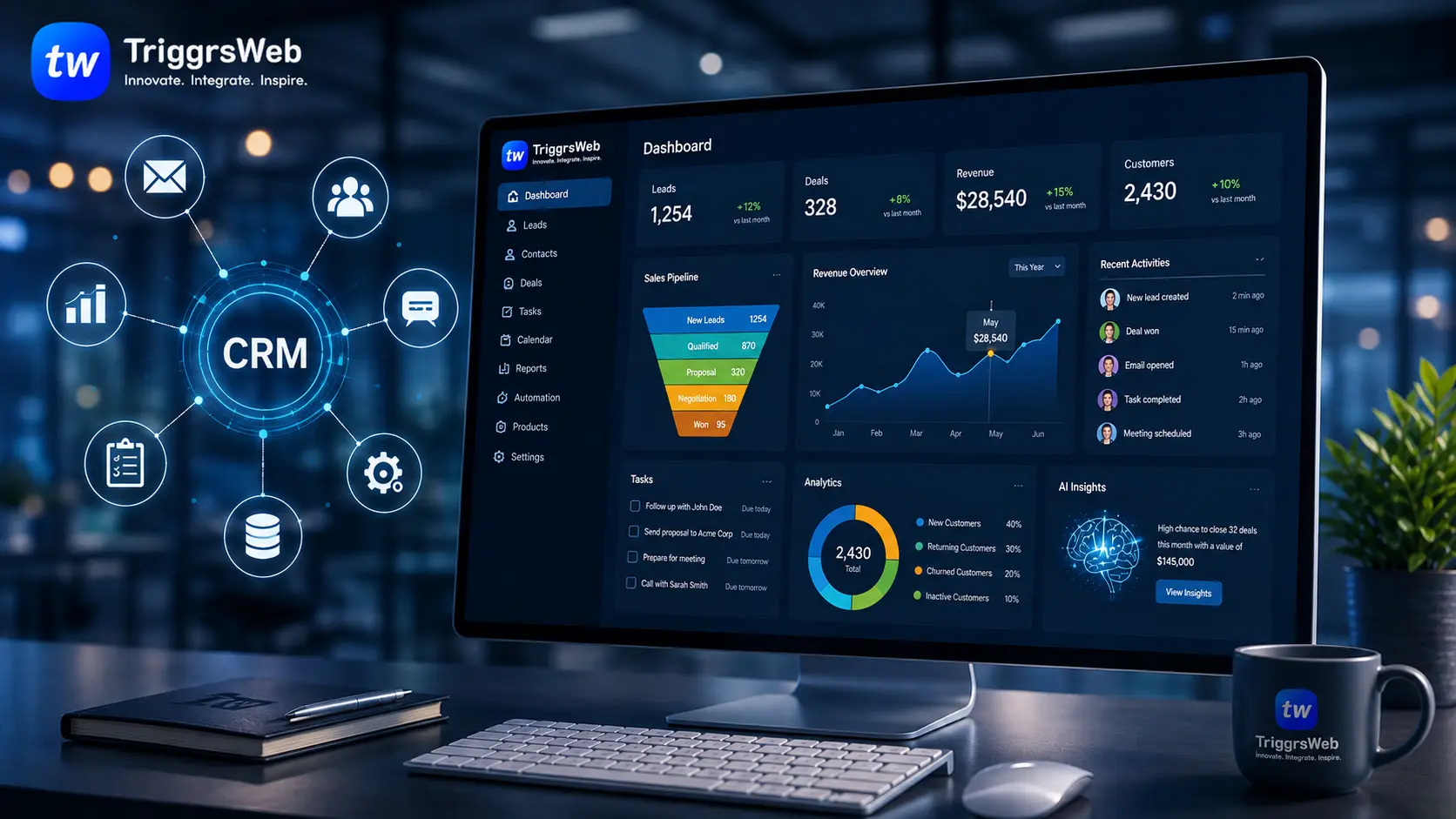
Reporting and Analytics
CRM reporting allows leadership teams to monitor performance and make informed decisions.
Useful CRM dashboards may track:
Revenue
Sales conversion rates
Pipeline value
Customer acquisition
Sales cycle length
Customer retention
Team performance
Custom dashboards ensure decision-makers see the metrics that are most important to their business.
Custom CRM vs Off-the-Shelf CRM: Which Is Better?
There is no single answer for every organization.
Off-the-Shelf CRM
Pre-built CRM platforms are often suitable for businesses that have relatively standard sales and customer management processes.
Advantages include:
Faster implementation
Lower initial investment
Pre-built functionality
Established integrations
However, businesses may eventually face limitations when processes become more complex.
Custom CRM Development
Custom CRM development is particularly valuable when businesses require:
Unique workflows
Complex business processes
Specialized integrations
Industry-specific features
Greater control over data
Custom dashboards
Advanced automation
A custom system is designed around the business instead of requiring the business to adapt to the software.
How a CRM Development Company Builds a Custom Solution
A professional development process should begin with understanding the business rather than immediately writing code.
Step 1: Business Process Discovery
The development team studies:
Sales processes
Customer journeys
Existing software
Data flows
Team responsibilities
Operational challenges
This step helps identify inefficiencies and opportunities for automation.
Step 2: CRM Strategy and Architecture
The team defines:
System modules
User roles
Data architecture
Integrations
Security requirements
Automation workflows
A strong architecture helps ensure the CRM can scale as the business grows.
Step 3: UI and UX Design
CRM software is often used daily by sales, support, marketing, and operations teams.
Therefore, usability is critical.
The interface should make it easy for employees to:
Find information
Update records
Manage tasks
Track opportunities
Generate reports
Poor CRM usability often leads to low adoption across the organization.
Step 4: Development and Integration
The CRM is developed and integrated with relevant business systems.
Common integrations include:
Email platforms
Marketing automation tools
Accounting software
ERP systems
Payment platforms
Customer support systems
Communication tools
Step 5: Testing and Deployment
Before launch, the CRM should be tested for:
Performance
Security
Data accuracy
User workflows
Integrations
Scalability
Step 6: Ongoing Improvement
A CRM should evolve with the business.
New workflows, integrations, automation, and reporting requirements may be introduced over time.
How to Choose the Right CRM Development Company
Choosing a technology partner is an important business decision.
Here are the most important factors to consider.
1. Business Understanding
A good CRM development company should first understand your business processes.
Be cautious of companies that immediately recommend a technology without asking questions about:
Your sales process
Customer lifecycle
Team structure
Current challenges
Growth plans
The best solution begins with understanding the problem.
2. Custom Software Development Experience
CRM systems often become mission-critical business platforms.
Your development partner should have experience with:
Enterprise software
Workflow automation
API integrations
Cloud infrastructure
Security
Scalable architecture
Ask about previous experience building complex business applications.
3. Integration Capabilities
Your CRM will likely need to communicate with other systems.
Make sure the development partner understands:
APIs
Third-party integrations
Data synchronization
Legacy system integration
Integration challenges should be identified early in the project.
4. Scalability
Your CRM should support your business today and in the future.
Consider:
Increasing users
Larger customer databases
New departments
Additional integrations
New automation workflows
Scalable architecture reduces the need for major system redesigns later.
5. Security and Data Protection
CRM systems contain valuable customer and business information.
Your development partner should implement appropriate:
Authentication
Role-based access controls
Data encryption
Backup processes
Security monitoring
Security should be part of the development process from the beginning.
How Much Does Custom CRM Development Cost?
The cost of CRM development depends on several factors.
These include:
Number of features
Number of users
Complexity of workflows
Third-party integrations
Mobile application requirements
AI capabilities
Reporting requirements
Security requirements
A simple CRM may focus primarily on contacts, leads, and sales pipelines.
A more advanced enterprise CRM may include automation, AI assistants, analytics, ERP integrations, customer portals, and complex approval workflows.
For this reason, businesses should focus on defining requirements and expected outcomes before comparing development costs.
The cheapest development option is not always the most cost-effective solution if the system cannot scale or requires major redevelopment later.
How AI Is Transforming CRM Systems
Artificial intelligence is creating new opportunities for CRM automation and customer intelligence.
Modern AI-powered CRM systems can help businesses:
Score leads automatically
Identify high-value opportunities
Generate sales summaries
Analyze customer interactions
Recommend next actions
Automate customer communication
Predict customer behavior
AI agents can also support sales and customer service teams by completing specific tasks based on defined workflows.
For example, an AI-powered CRM could automatically review new leads, gather relevant information, score the opportunity, and assign it to the appropriate sales representative.
This creates opportunities for businesses to move beyond traditional record management toward more intelligent and proactive customer operations.
When Should Your Business Invest in Custom CRM Development?
Custom CRM development may be the right decision if:
Your team relies heavily on spreadsheets.
Customer data exists across multiple systems.
Your sales process requires custom workflows.
Employees spend significant time on manual administrative tasks.
Existing CRM software requires excessive customization.
Your business needs specialized integrations.
Reporting requirements are highly specific.
You want greater control over customer data and processes.
A CRM should solve operational problems rather than simply add another software tool to the organization.
Questions to Ask Before Starting a CRM Development Project
Before contacting a CRM development company, businesses should consider:
What problems are we trying to solve?
Which teams will use the CRM?
What systems must the CRM integrate with?
Which manual processes should be automated?
Which metrics should leadership track?
How many users will use the platform?
How will our requirements change as the business grows?
Clear answers to these questions can make the development process faster and more successful.
Key Takeaways
A CRM platform can become one of the most important systems in a growing organization.
The right CRM development company should do more than build software. It should understand your business processes, identify opportunities for automation, design scalable architecture, and develop a solution that supports long-term growth.
Before choosing a development partner, focus on:
Business process understanding
Custom development experience
Integration expertise
Scalability
Security
Long-term support
The best CRM solution is not necessarily the platform with the most features. It is the system that helps your teams work more efficiently, understand customers better, and make smarter business decisions.
Build a CRM That Fits Your Business
If your current customer management processes rely on disconnected tools, spreadsheets, or manual workflows, a custom CRM can help centralize operations and create a more scalable system.
A professional CRM development team can help analyze your existing processes, identify automation opportunities, and build a solution designed around your business requirements.
Ready to build a scalable CRM solution? Explore how custom software development, workflow automation, and AI-powered systems can transform your customer operations.
Recommended Articles
Learn more about AI, Automation & Custom Applications: