
Introduction
Artificial intelligence is changing more than the way people search for information or create content.
It is beginning to change how businesses operate.
For years, companies have used software to digitize their processes. Employees moved from spreadsheets to ERP systems, from emails to CRM platforms, and from manual reporting to dashboards and business intelligence tools.
But the fundamental operating model remained largely the same:
People use software to perform work.
The next generation of businesses is moving toward a different model:
Software and AI systems can participate in performing the work itself.
This is where the concept of an AI-native business becomes important.
An AI-native business does not simply have a chatbot, an AI writing tool, or an AI-powered feature. Instead, artificial intelligence becomes part of the organization's operational architecture.
AI can understand business context, work with organizational data, interact with software systems, execute workflows, generate insights, and in some situations take actions with appropriate human controls.
This shift is closely connected with the rise of AI agents, agentic workflows, intelligent automation, large language models (LLMs), business APIs, and AI-powered enterprise platforms.
What Is an AI-Native Business?
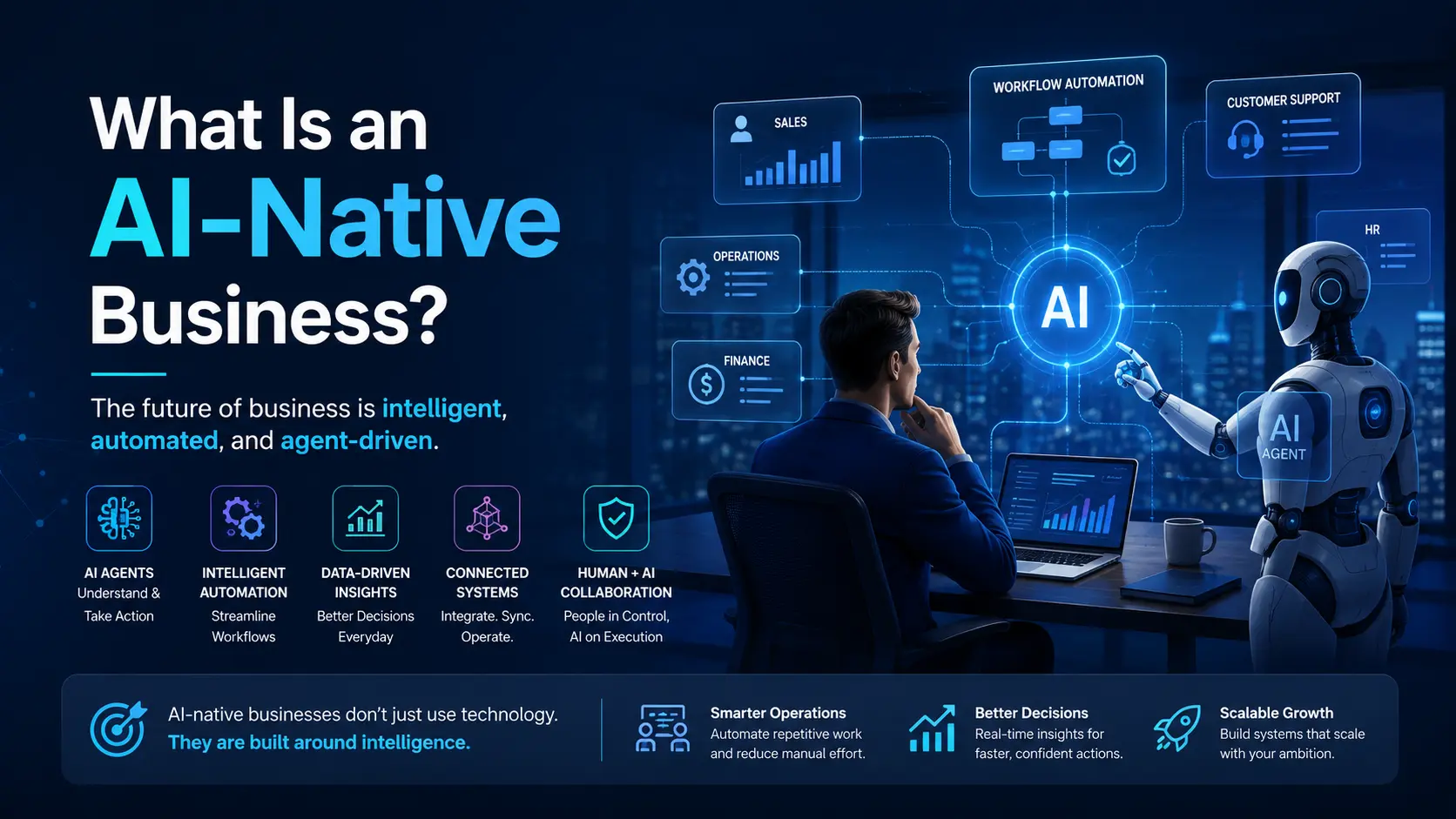
An AI-native business is a company that designs its products, processes, workflows, and decision-making systems with AI as a fundamental component of how work gets done.
Traditional businesses generally add AI to existing processes.
AI-native businesses rethink those processes around what AI can do.
Traditional approach
Employee
   ↓
Business Application
   ↓
Manual Data Entry
   ↓
Manual Processing
   ↓
Human Decision
   ↓
Manual Action
   ↓
Report
AI-native approach
Business Event
      ↓
AI Agent
      ↓
Understand Context
      ↓
Access Business Data
      ↓
Reason / Plan
      ↓
Execute Workflow
      ↓
Update Business Systems
      ↓
Notify Human
      ↓
Monitor Result
The important difference is not simply the presence of AI.
The difference is where AI sits inside the business process.
AI-Native Does Not Mean "AI Everywhere"
One of the biggest misconceptions about AI-native businesses is that every process needs to use artificial intelligence.
That is not the goal.
AI should be used where it provides a meaningful advantage.
For example, a company may continue using traditional software for:
Financial calculations
Database transactions
Authentication
Inventory records
Deterministic business rules
Compliance workflows
Structured data processing
AI may be more useful for:
Understanding unstructured information
Classifying incoming requests
Summarizing large amounts of data
Generating reports
Making recommendations
Customer communication
Lead qualification
Planning multi-step workflows
Detecting patterns
Assisting employees
Executing actions across multiple systems
An AI-native architecture therefore combines traditional software + automation + AI, rather than attempting to replace everything with an LLM.
What Makes a Business AI-Native?
There are several characteristics that distinguish an AI-native organization from a company that simply uses AI tools.
1. AI Is Connected to Business Data
AI becomes significantly more useful when it can work with relevant business context.
A generic AI model may know how to write an email.
An AI system connected to a company's business data can potentially answer:
Which leads have not been contacted in the last three days?
Or:
Which sales opportunities are likely to require attention this week?
Or:
Generate the management report for yesterday's operations.
The difference is context.
An AI-native business therefore needs well-structured access to its operational data.
This could include:
CRM data
HR information
Sales records
Customer information
Operational data
Financial information
Documents
Communication history
Inventory
Projects
Internal knowledge
The AI does not necessarily need unrestricted access to everything. Instead, systems should provide controlled, permission-aware access to the information required for a particular task.
2. AI Agents Become Part of the Workforce
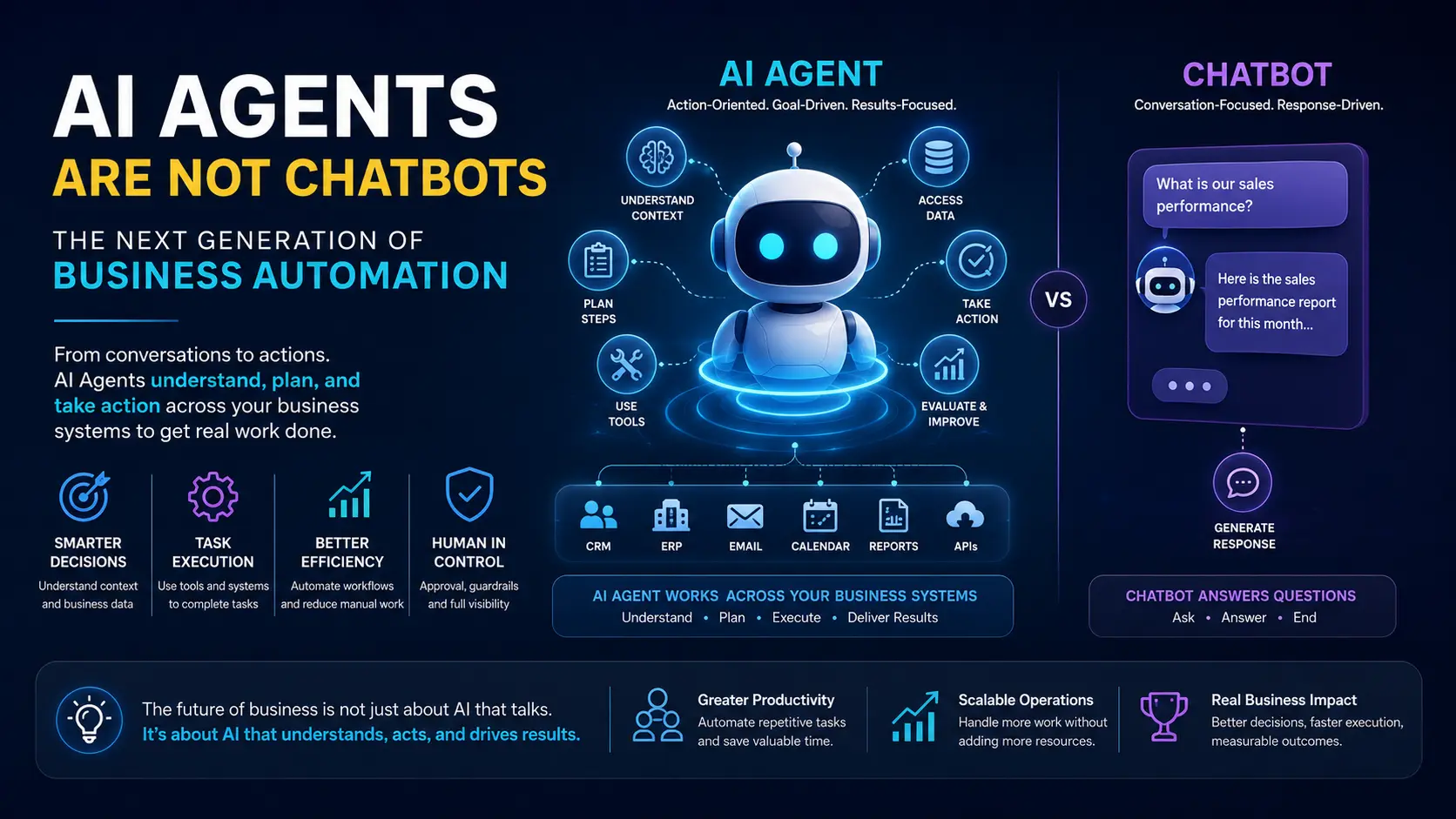
The evolution from chatbots to AI agents is one of the most important changes in enterprise AI.
A chatbot primarily responds to a user.
An AI agent can be designed to:
Understand a goal
Gather relevant information
Decide what needs to happen
Use available tools
Execute actions
Evaluate the result
Continue the workflow when required
For example, consider a sales operation.
Traditional process
A sales executive:
Checks new leads
Reviews lead information
Calls the prospect
Updates CRM
Schedules follow-up
Sends an email
Updates the sales manager
AI-assisted process
An AI sales agent could potentially:
Detect a new lead
Enrich available information
Classify the lead
Recommend priority
Prepare communication
Schedule a follow-up
Update the CRM
Notify the sales representative
Escalate important opportunities
The human remains involved where judgment, approval, negotiation, or accountability is required.
This creates a human + AI operating model.
3. Business Processes Become Agentic
Traditional automation usually follows predefined rules.
For example:
IF
invoice_status = overdue

THEN
send reminder email
This is deterministic automation.
It is extremely useful when the process is predictable.
Agentic automation introduces another layer.
Instead of simply following a fixed rule, an AI system can interpret context and determine which available action is appropriate.
For example:
New customer request
       ↓
Understand request
       ↓
Identify customer
       ↓
Review previous interactions
       ↓
Determine request type
       ↓
Retrieve relevant information
       ↓
Decide next action
       ↓
Execute / Request approval
       ↓
Update CRM
       ↓
Record outcome
This does not mean that every process should be autonomous.
The important development is that business software can increasingly combine rules, workflows, APIs, and AI reasoning.
4. Software Becomes Action-Oriented
Traditional business software is primarily designed around screens.
An employee logs into a system, finds a record, clicks through multiple screens, enters information, and performs an action.
AI-native software can introduce a different interaction model.
Instead of:
"Open the CRM → Find the customer → Open the opportunity → Update the status."
An employee might simply ask:
"Show me all high-value opportunities that have not received a follow-up this week and prepare follow-up messages."
The AI system can translate the request into operations across business systems.
This creates a transition from:
Software that stores information
to:
Software that understands information and helps execute work.
5. Automation Becomes Intelligent
Traditional automation is powerful because it is predictable.
But traditional automation struggles when information is unstructured.
Consider an email inbox containing:
Customer complaints
Sales inquiries
Vendor requests
Internal requests
Documents
Notifications
Contracts
Meeting requests
A traditional workflow may struggle to determine what each message means.
An AI-powered workflow can classify and interpret the information before deciding which workflow should handle it.
For example:
Incoming Email
      ↓
AI Classification
      ↓
Customer Complaint?
      │
      ├── Yes → Support Workflow
      │
      ├── Sales Inquiry → Sales Workflow
      │
      ├── Vendor Request → Procurement Workflow
      │
      └── Internal Request → Employee Workflow
AI therefore becomes an intelligence layer on top of automation.
The AI-Native Technology Stack
An AI-native business does not consist of a single AI model.
It requires multiple layers working together.
A simplified architecture can look like this:
                    USERS
                      │
                      ↓
              AI / Application Layer
                      │
              ┌───────┴───────┐
              ↓               ↓
          AI Agents       Traditional UI
              │
              ↓
        Agent Orchestration
              │
       ┌──────┼──────┐
       ↓      ↓      ↓
      APIs   MCP    Tools
       │      │      │
       └──────┼──────┘
              ↓
        Business Systems
       ┌──────┼─────────┐
       ↓      ↓         ↓
      CRM    HRMS      ERP
       │      │         │
       └──────┼─────────┘
              ↓
        Business Data
              │
       ┌──────┼──────┐
       ↓      ↓      ↓
    Database Documents Knowledge
Different technologies have different responsibilities.
LLMs
Provide language understanding and reasoning capabilities.
AI Agents
Use models, tools, context, and instructions to accomplish business goals.
APIs
Allow software systems to communicate with one another.
MCP and similar protocols
Can provide standardized ways for AI systems to discover and use tools and contextual information.
Workflow Engines
Manage deterministic business processes, scheduling, approvals, and events.
Databases
Store structured operational information.
Knowledge Systems
Provide access to documents, policies, manuals, and other unstructured information.
Observability
Tracks what AI systems are doing, how they perform, and where failures occur.
AI-Native vs AI-Enabled Business
These terms are often confused.
AI-Enabled Business
An existing company adopts AI tools.
Examples:
AI writing assistant
AI customer chatbot
AI image generation
AI meeting summaries
AI-powered analytics
AI improves individual activities.
AI-Native Business
AI is integrated into the organization's operating architecture.
Examples:
AI agents interact with business systems
AI participates in workflows
Business processes are designed around automation
AI continuously analyzes operational data
Humans supervise higher-risk decisions
Systems can execute multi-step tasks
Data is structured for machine consumption
The distinction can be summarized as:
AI-enabled businesses use AI tools. AI-native businesses design operations around AI capabilities.
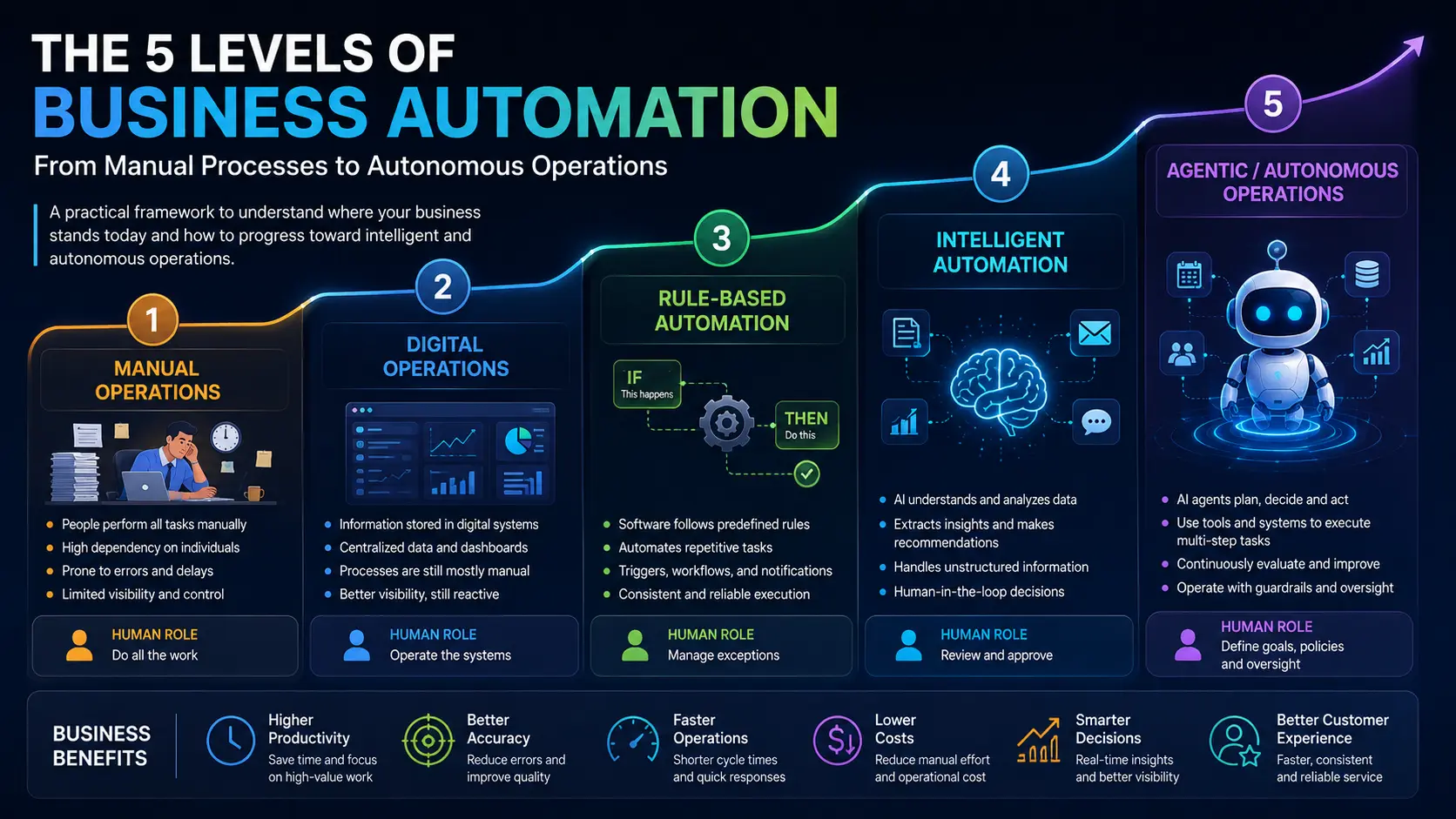
The Five Levels of Business Automation
Businesses can think about their AI transformation as a progression.
Level 1 — Manual Operations
People perform most processes manually.
Human → Human → HumanLevel 2 — Digital Operations
Software stores and organizes information.
Human → Software → DatabaseLevel 3 — Automated Operations
Rules execute repetitive processes.
Event → Rule → Workflow → ActionLevel 4 — Intelligent Operations
AI understands information and assists decision-making.
Data → AI → Recommendation → HumanLevel 5 — Agentic Operations
AI can execute multi-step processes using authorized tools.
Goal
 ↓
AI Agent
 ↓
Reason
 ↓
Plan
 ↓
Tools
 ↓
Actions
 ↓
Result
Most organizations do not need to jump directly to Level 5.
The best transformation strategy is usually to identify individual processes where AI can create measurable value and progressively introduce intelligence and autonomy.
Examples of AI-Native Business Operations
AI-native architecture can be applied across almost every business function.
Sales
AI can help:
Qualify leads
Prioritize opportunities
Generate follow-ups
Analyze sales conversations
Update CRM records
Identify inactive opportunities
Generate sales reports
Human Resources
AI can assist with:
Employee queries
Candidate screening
Interview coordination
Onboarding workflows
HR document analysis
Attendance and policy queries
Employee reporting
Customer Support
AI can:
Understand customer requests
Search knowledge bases
Recommend solutions
Update support tickets
Escalate complex issues
Generate responses
Analyze recurring complaints
Operations
AI can:
Monitor operational events
Identify exceptions
Generate reports
Assign tasks
Coordinate workflows
Detect unusual patterns
Recommend corrective actions
Management
AI can become an intelligent business interface.
A management team could ask:
"What changed in the business yesterday?"
Instead of manually opening multiple dashboards, the system could collect information across departments and generate a structured operational summary.
What About ERP, CRM and Existing Business Software?
Becoming AI-native does not mean replacing every existing application.
In many organizations, the better approach is to build an AI layer around existing systems.
For example:
                  AI AGENT LAYER
                        │
        ┌───────────────┼───────────────┐
        ↓               ↓               ↓
       CRM             ERP             HRMS
        │               │               │
        └───────────────┼───────────────┘
                        ↓
                  Business Data
Existing software continues to manage transactions.
AI becomes the layer that can understand context, coordinate processes, and interact with those systems.
This approach can make AI adoption significantly more practical for organizations that already have years of business data and established software infrastructure.
The Importance of AI-Ready Data
AI capabilities are only as useful as the business context available to them.
A company may have a powerful LLM, but if its customer information is fragmented across:
Excel files
WhatsApp conversations
Email
CRM
ERP
Documents
Local systems
then creating reliable AI automation becomes significantly harder.
This is why data architecture is becoming an important part of AI transformation.
Businesses should consider:
Centralized data
Consistent identifiers
Structured APIs
Access controls
Data quality
Business permissions
Audit logs
Knowledge repositories
AI transformation is therefore not only an AI problem.
It is also a systems architecture problem.
Security and Human Oversight
Giving an AI agent access to business systems introduces an important question:
What is the agent allowed to do?
An enterprise AI system should not automatically receive unrestricted access.
Permissions should be designed around:
User identity
Roles
Business permissions
Tool permissions
Data access
Approval requirements
Auditability
Action history
For higher-risk actions, organizations can introduce human approval.
For example:
AI Agent
   ↓
Prepare Payment
   ↓
Approval Required
   ↓
Finance Manager
   ↓
Approved
   ↓
Execute Payment
This creates a controlled model of human-in-the-loop automation.
How Should a Business Become AI-Native?
The transformation should not start with:
"Where can we add AI?"
A better question is:
"Which business processes consume the most human effort and could be improved through intelligence, automation, or better decision-making?"
A practical roadmap can be:
Step 1 — Map Business Processes
Identify how work currently moves through the organization.
Step 2 — Identify Repetitive Work
Find tasks involving:
Copying information
Reporting
Classification
Follow-ups
Data entry
Notifications
Document processing
Step 3 — Identify AI Opportunities
Determine which processes require understanding, classification, prediction, summarization, or decision support.
Step 4 — Connect Business Systems
Expose required information and actions through secure APIs and tools.
Step 5 — Introduce Automation
Automate deterministic processes first.
Step 6 — Introduce AI
Add AI where contextual understanding provides additional value.
Step 7 — Add Human Controls
Define which actions require approval and which can be executed automatically.
Step 8 — Measure Outcomes
Track:
Time saved
Processing time
Error reduction
Revenue impact
Employee productivity
Customer response time
Automation rate
AI transformation should ultimately be measured by business outcomes, not by how many AI models a company deploys.
The Future of Enterprise Software
Enterprise software has historically evolved through several stages.
First generation
Digitize the process.
Second generation
Connect the process.
Third generation
Automate the process.
Emerging generation
Understand and execute the process.
This does not mean traditional applications disappear.
Instead, the relationship between people and software changes.
Employees may increasingly interact with business systems through natural language, AI assistants, agents, and automated workflows while traditional interfaces continue to exist for detailed control and specialized operations.
The result could be an enterprise environment where software does more than record what happened.
It can help determine what should happen next—and, where authorized, make it happen.
AI-Native Does Not Mean Autonomous Everything
There is an important distinction between AI-native and fully autonomous.
An AI-native company can still have humans making critical decisions.
In fact, the strongest enterprise architectures will likely combine:
AI + Automation + Human Judgment + Traditional Software
The goal is not to remove people from every process.
The goal is to remove unnecessary manual work so people can spend more time on:
Strategy
Relationships
Negotiation
Creativity
Leadership
Complex decisions
Customer experience
AI should therefore be viewed as an operational capability, not simply a replacement for employees.
Final Thoughts
The next stage of digital transformation is not simply about adding an AI chatbot to an existing website.
It is about reconsidering how businesses operate.
An AI-native business connects:
People + Data + Software + Automation + AI
into a coordinated operating environment.
The companies that benefit most from this shift will not necessarily be those using the largest AI models.
They will be the companies that understand where AI can create real operational value, connect AI to reliable business data, build secure integrations, automate the right processes, and establish appropriate human oversight.
The fundamental shift is from:
"We use software to manage our business."
to:
"Our software helps operate the business."
That is the beginning of the AI-native enterprise.
Frequently Asked Questions
What is an AI-native business?
An AI-native business is an organization that integrates artificial intelligence into its core operations, workflows, products, and decision-making processes rather than using AI only as an isolated productivity tool.
What is the difference between an AI-native and AI-enabled business?
An AI-enabled business adds AI capabilities to existing processes. An AI-native business designs its processes and technology architecture around AI, automation, business data, and intelligent workflows.
Are AI agents required for an AI-native business?
Not necessarily. AI agents are an important component of many AI-native architectures, particularly where AI needs to perform multi-step tasks or interact with business systems. However, traditional automation and deterministic software remain important.
Can AI agents connect to ERP and CRM systems?
Yes. AI agents can interact with business applications through APIs, tools, integration layers, and emerging protocols designed for connecting AI systems with external capabilities.
Will AI-native businesses replace ERP systems?
Not necessarily. In many cases, AI can operate as an intelligence and interaction layer around existing ERP, CRM, HRMS, and other enterprise applications.
Is an AI-native business fully autonomous?
No. AI-native does not mean fully autonomous. Organizations can use human approval and permission controls for sensitive or high-risk actions.
How can a company start becoming AI-native?
Start by mapping business processes, identifying repetitive work, evaluating AI opportunities, improving data accessibility, connecting existing systems through APIs, introducing automation, and gradually deploying AI agents where they provide measurable business value.
Key Takeaway
AI-native businesses are not defined by how much AI they use. They are defined by how deeply AI is integrated into the way the business operates.
The future of enterprise software is moving from systems that simply store, display, and report information toward systems that can understand context, coordinate workflows, assist decisions, and execute authorized actions.